
(AI UX) New Onboarding for Desktop GUI Application for Local AI Models
Problem
The key motivation for this project from the very beginning is to address the ongoing problem of integrating AI into established Enterprise environments where regulatory compliance with cybersecurity compliance standards like SOC 2 and privacy laws like the US's Health Insurance Portability and Accountability Act (HIPAA) remains an unresolved design challenge. As UX orgs were beginning to adopt tools like ChatGPT and Gemini in 2023-2024, I began noticing the downside to feeding information into these cloud models and the potential consequences of allowing cloud providers to learn from this information. The thought in my mind was "what are the consequences of sharing my personal information about my mental and physical health to this model on the cloud?" This immediate concern I had ties back to HIPAA's requirement to protect patients' personal health information from unauthorized access and that organizations must perform regular security assessments. Given the limited resources I have a solo designer, this case study will only focus on onboarding. Other components are out of scope.
Products including LM Studio and Ollama exist (both released in 2023), but are heavily developer-centric. GPT4ALL is still available on GitHub for general chatting and exploration, but the latest version available was released on February 24, 2025, with no updates since.
Overview
My time as the UX Designer for ExamSoft gave me the opportunity to lead and deliver high-level workflows for administrators, instructors, and curriculum boards of many medical schools and other graduate programs that use ExamSoft's products. Towards the end of my time at Turnitin, I defined research objectives and goals via Userlytics platform for A/B testing to inform product decisions for ExamSoft’s AI question generation features. This experience validated that concerns about security and effectiveness of AI within regulated environments are key blockers to AI adoption.
My Role
I am the sole UX Designer leading this project through the following methods:
- Research & Discovery (Primary)
- Analysis of Public Research (Secondary)
- Analysis & Release of Survey Data
- Workflow Diagrams
- Lo-Fi Prototype (Claude Code)
- Hi-Fi Prototype
Tools
- Penpot
- LibreOffice Docs
- Social Media Polls
Guiding Principles
- Responsible Use of AI - AI is used to support deliverables where it adds efficiency, without replacing my critical thinking and problem-solving process
- Transparent use of images and software packages - all tools and images used for this project will be mentioned with their respective licenses
1
Target Audience
I wanted to establish broad characteristics for the audience I'm designing for based on industries with tighter regulations. The target audience are professionals working in regulated industries where data privacy and compliance are operational realities:
- Education
- Government
- Finance & Accounting
- Psychology
- Social Work
- Healthcare
2
Hardware Requirements
The app should be able to run on as many Mid to High range machines to comply with the diverse range of specifications within labs and office environments:
- 8 to 16-core CPU
- 16 to 32 GB Ram
- 25 GB available storage
- Windows 10,11, macOS Ventura, Sonoma, Sequoia (currently supported versions), and Debian-based Linux Distributions
3
Assumptions
- Privacy – To address the issue of privacy, a local Large Language Model (LLM) that can be 2 to 4.5 GB in size will need to be downloaded to the user’s computer with full disclosure of the process and how a local LLM differs from a cloud-based LLM such as ChatGPT, Gemini, Docusign AI, Adobe, etc
- Evolving Landscape – AI is changing quickly with more AI models expected to come in the near future, and the cons of each AI now will someday be addressed
- Competition with Proprietary Offerings – Microsoft’s Copilot AI is fully integrated with the Windows 11 OS, which will make it challenging to promote the benefits of local AI and privacy to this user base
- Competition with Open Source Offerings – RedHat's OpenShift AI is becoming a top feature in Red Hat Enterprise Linux, so targeting Debian-based distributions will be a key strategy for this project
4
Constraints
- Independent Research – Data from independent polls with a small sample size from LinkedIn and Facebook was necessary to avoid using data from NDA protected work
- Independent Development – All this work is a solo endeavor where progress on this project is reliant on time and availability, with a lack of large peer review typical of enterprise organizations
5
Discovery
I first wanted to ask users across LinkedIn and Facebook what the biggest concerns are for running local AI models.
Question: what would be your biggest concern with running a local AI model on your PC/Mac? with the following options:
- Large file size/long download
- Needing the best specs to run
- High electric bills
- Windows or macOS blocking it
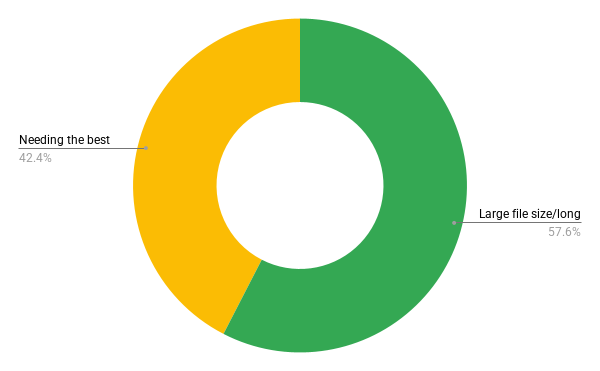
The poll results reveal that 57.6% are concerned with large file sizes and long download times, 42.4% expressed concern with needing the best specs to run local AI models, and no participants expressed any concerns with high electric bills or the operating system blocking its installation. Taking these two takeaway based on the poll data should reduce early dropoff and support requests related to failed downloads or performance bottlenecks:
- Informing users of the size and estimated download time for each AI model is crucial
- Users need to be aware of the system requirements of each model to avoid running ones which could lead to slowdowns, overheating, or crashes under strain
6
Mapping GPT4ALL Workflow
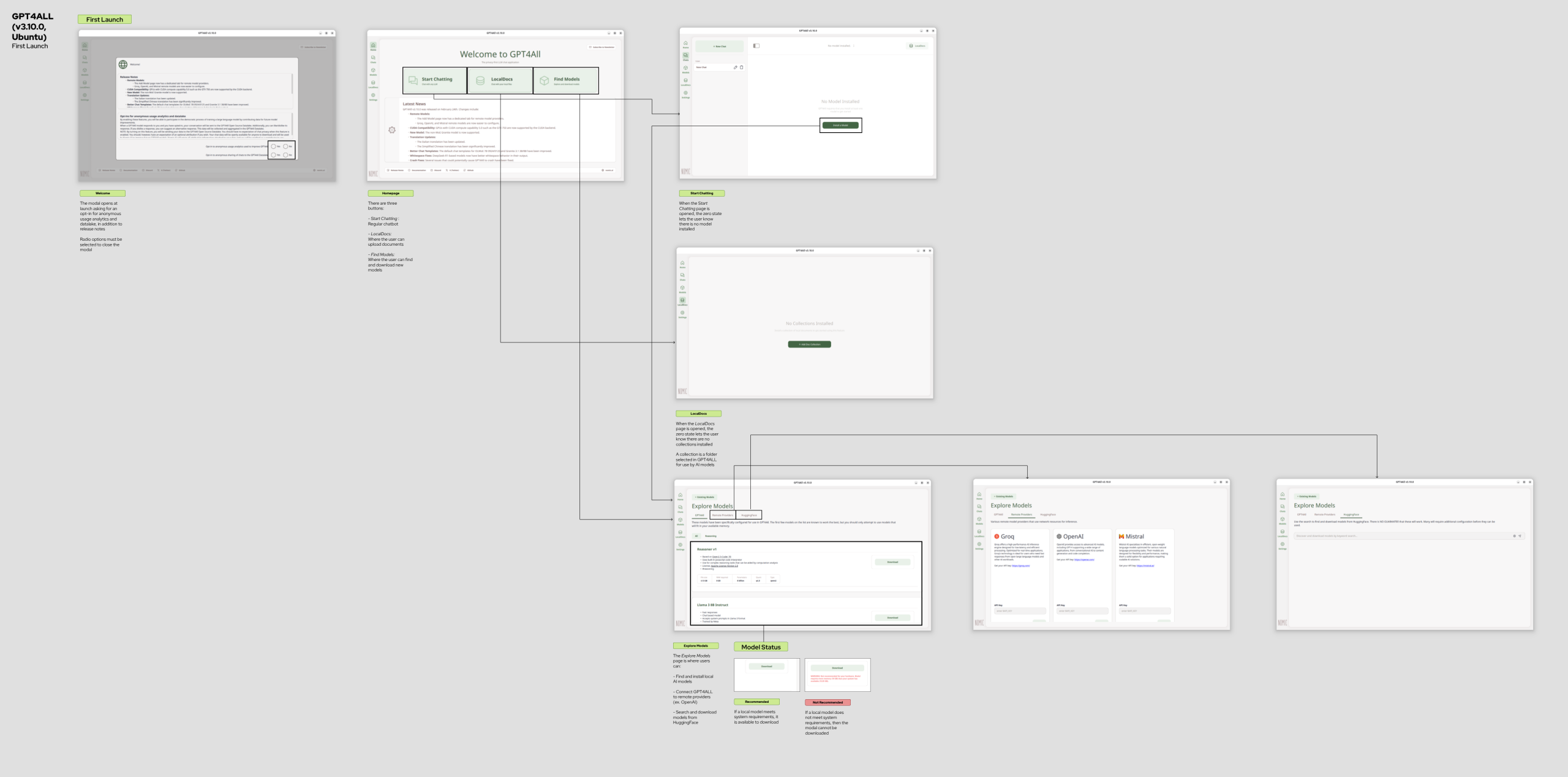
I created this workflow diagram for GPT4ALL at first launch to identify how onboarding addresses the concerns according to poll data in the discovery phase.
Pros
- The explore models page offers great options, including Llama 3 8B Instruct and Deepseek-R1-Distill-Qwen-7B, to choose from
- Important data points including file size, RAM required, Parameters, Quant, and Type are included for each model
- Warnings are given to models not recommended for the user’s specs
- Users can also link GPT4ALL to cloud providers like OpenAI and Mistral
- HuggingFace models can be searched for and downloaded as well
Cons
The Welcome modal asks users if they would like to opt-in for anonymous usage-analytics and/or sharing of chats to the GPT4ALL datalake. Unlike GPT4ALL, the datalake is under the Apache-2.0 license, and its purpose is to “ingest, organize and efficiently store all data contributions made to gpt4all”
The release notes conflict with the more important information about the usage analytics and the datalake.
Latest News takes up half of the horizontal space of the main dashboard, which the poll results suggest may not be as important for users
7
Current & New Information Architecture
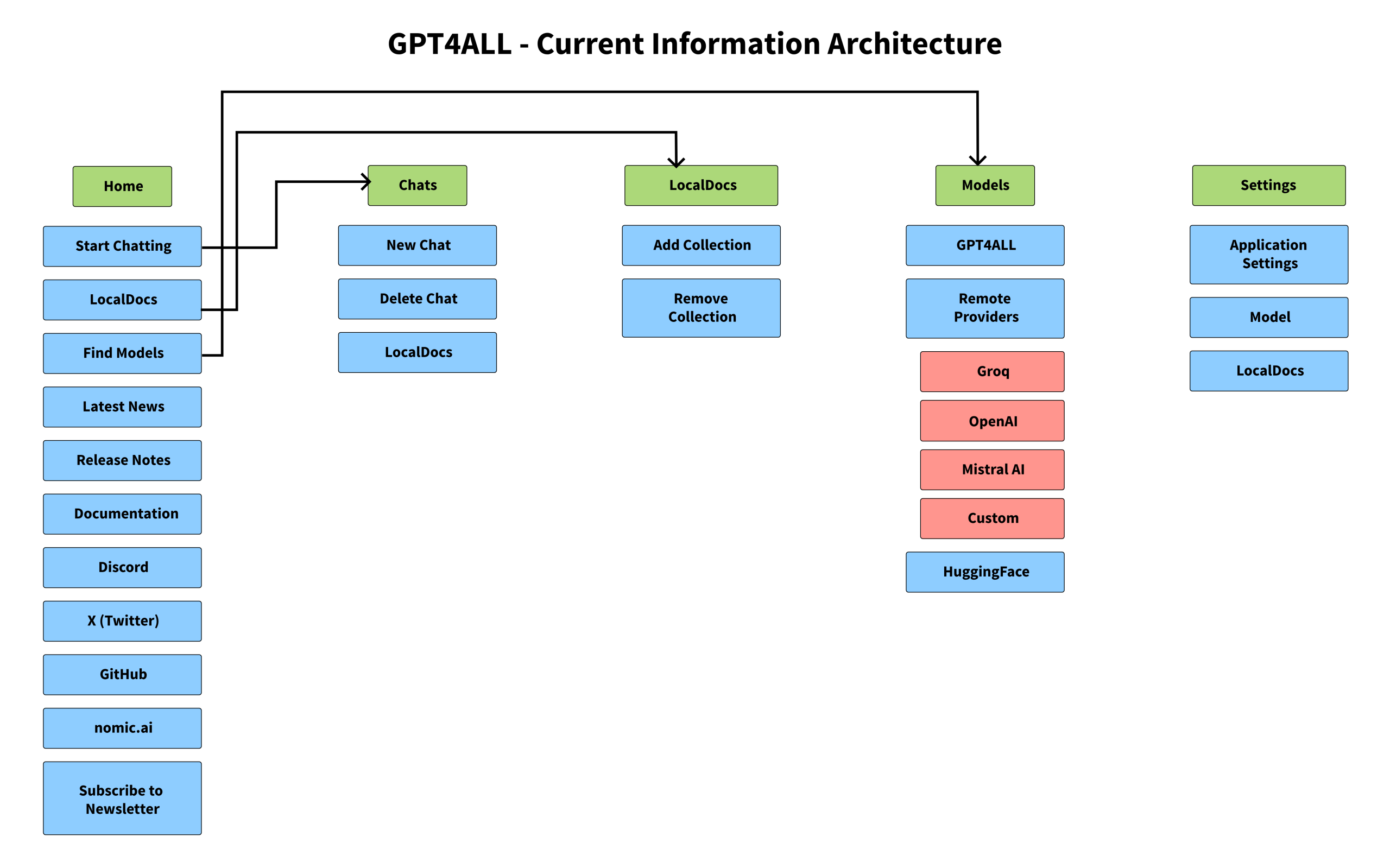
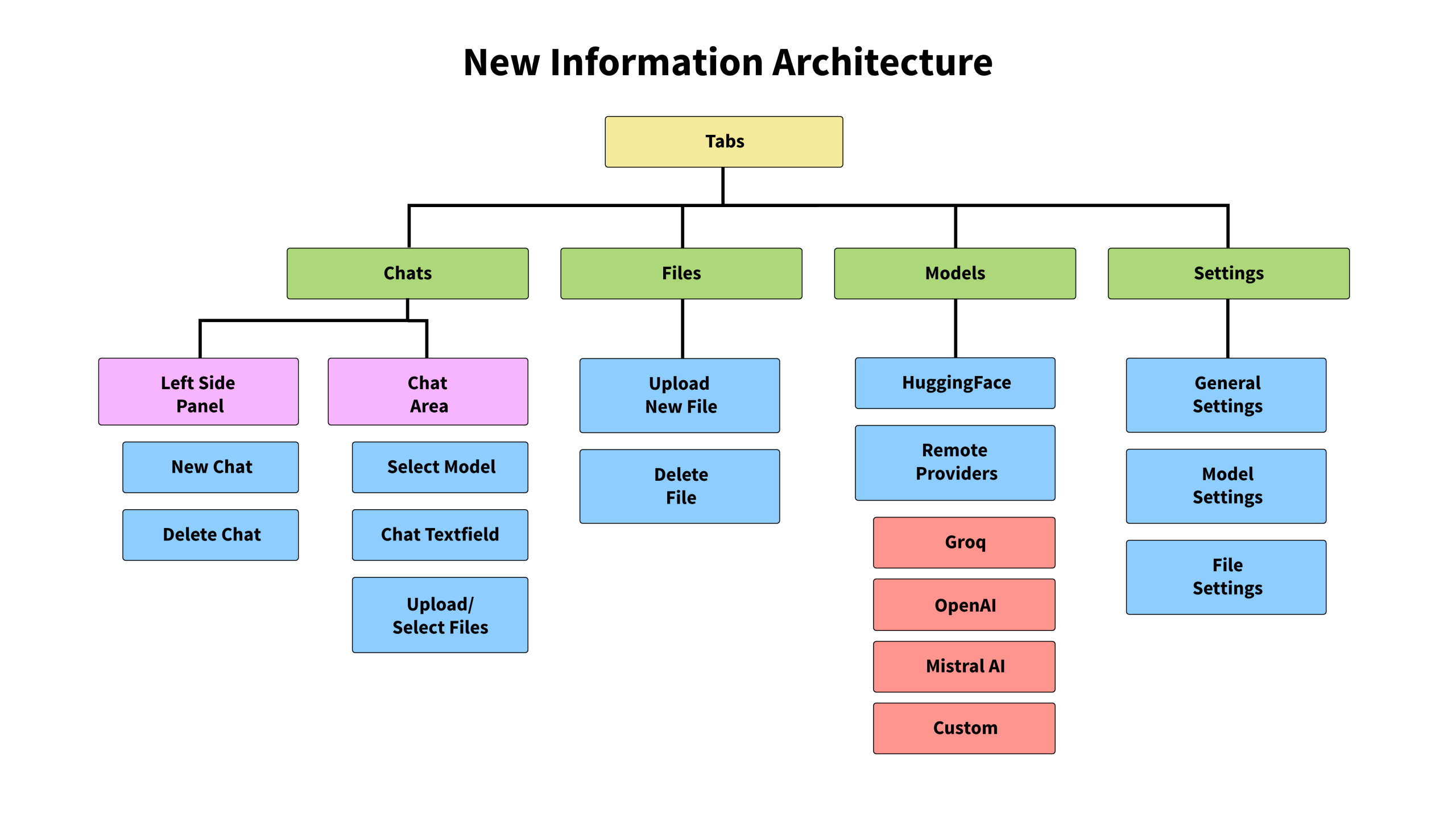
Created a diagram illustrating the current information architecture of GPT4ALL, and then created a new IA that addresses user concerns:
- Redundant homepage is removed in favor of focusing on downloading and interacting with models
- Latest News is removed as it distracts users from the main focus of interacting with local LLMs
- Release notes, social media links, button to subscribe to newsletter, and company website are removed to make focus of application clearer
Features being retained:
- Option to link to cloud provider (OpenAI, Groq, Mistral AI, or custom) - not anti-cloud, but privacy conscious
- Three separate settings pages for general, model, and file settings for both novice and advanced users
8
Workflow Diagrams
Two workflow diagrams were created in Penpot outlining two possible ways to handle onboarding. Option 1 showcases a guided approach that checks system specs on launch and warnings about low specs, while Option 2 retains the option for the user to discover the application on their own without a system check on launch. Option 1 is the one I decided to go with as it best addresses the concern from poll data regarding the concern around system requirements.
Open Questions
- Will users find it helpful to have a default AI model picked?
- ...Or will they appreciate being able to choose the AI model to start with?
- Would it be helpful to include a system check in the beginning?
- ...Or will this be unnecessary?
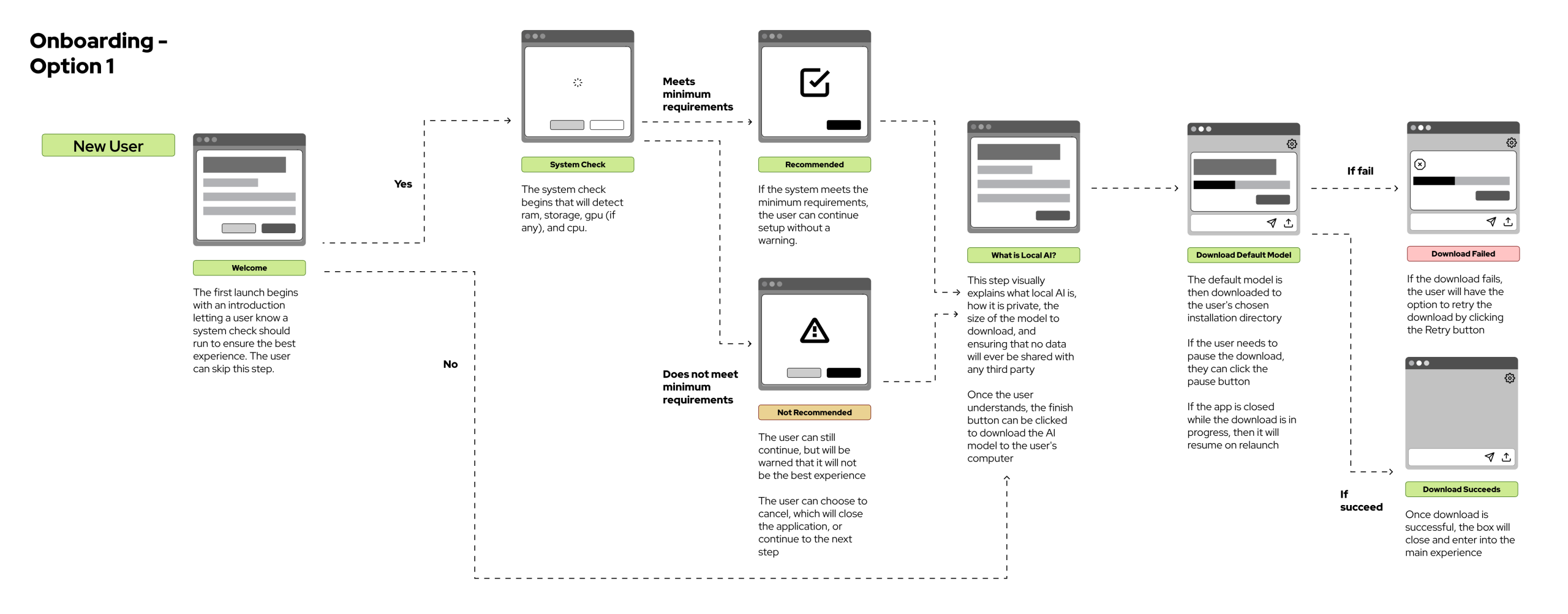
Pros
- App checks the user's system specifications to ensure compatibility without completely blocking the user from continuing with the experience anyway
- A default model is picked for download so users don't feel overwhelmed by needing to pick a model from a long list to start using the application
Cons
- Users may feel let down if the application deems the system specifications not ideal for the default AI model - "I download the app only for it to not be recommended?"
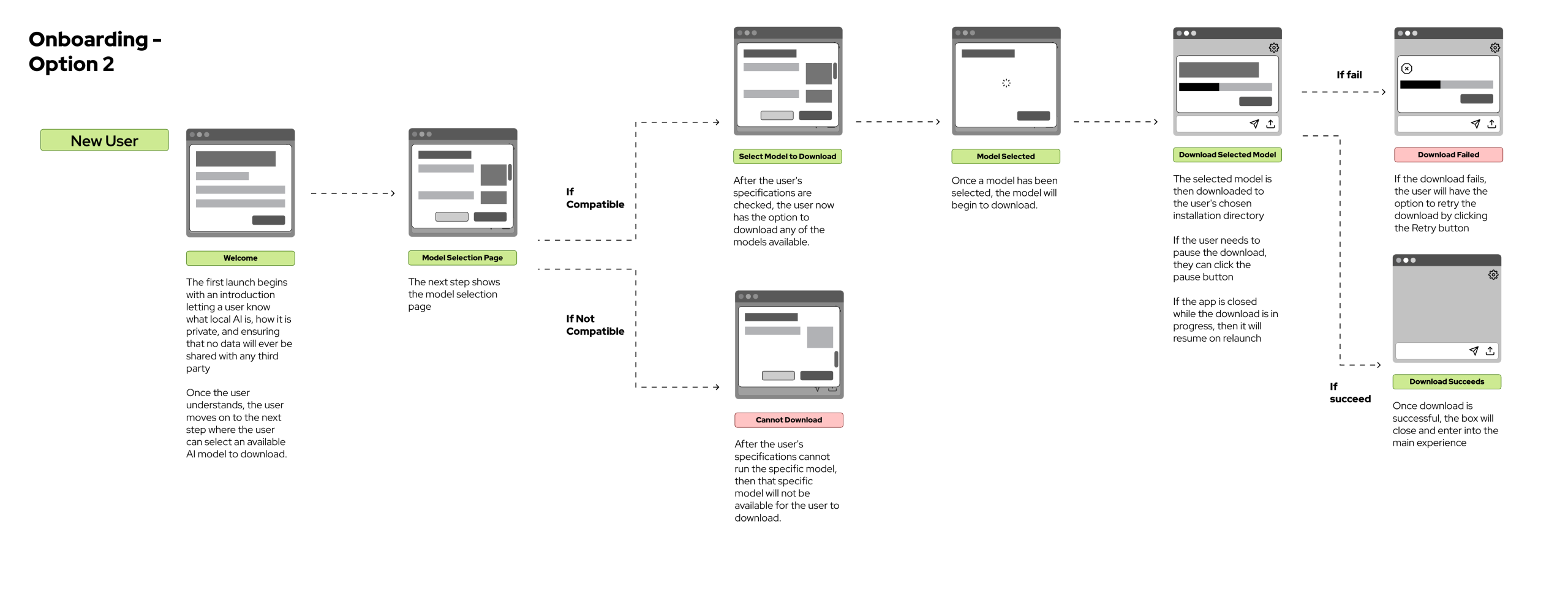
Pros
- Advanced users can choose which AI model to start with for their first experience with the application
- No compatibility check in the beginning that may be seen as unnecessary for some advanced users
Cons
- Beginning the experience with a long list of AI models to choose from may be overwhelming for novice users
- No guidance on what would be the best AI model to choose as a first time user
9
Dashboard Sketches
l wanted to explore multiple ways of designing the dashboard UI after boarding. I began moving away from the existing GPT4ALL terminology (LocalDocs, Collections) and toward terminology users are more familiar with. This decision to move towards user-friendly terminology carries right back to onboarding.
- Chats - This is the page where all the user's chats with their LLMs are stored
- AI Store - Here the user can find other models to download. The downside to this name is it assumes some AI models will be available for purchase, when all AI models are free to download
- Files - This is where the user can revisit all files uploaded for interaction with an AI model
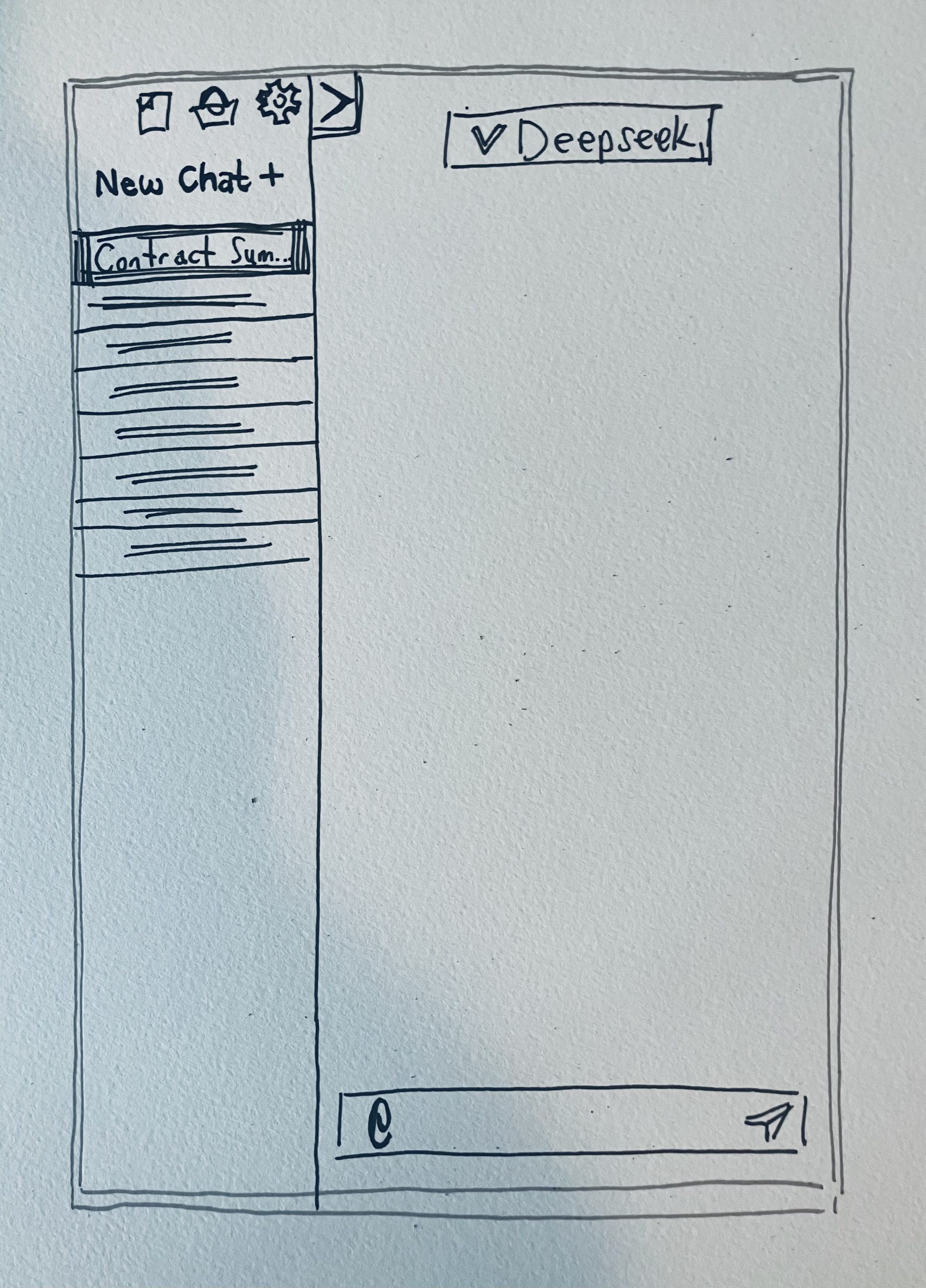
Collapsible Sidebar
- Offers a more familiar experience to ChatGPT, with all of the user's chats available within the sidebar
- The tab allows expanding/collapsing the sidebar
Considerations
- Is the familiar ChatGPT experience the best choice, or is there a better approach?
- The current location of the files, AI store, and settings icons may not be noticeable to users
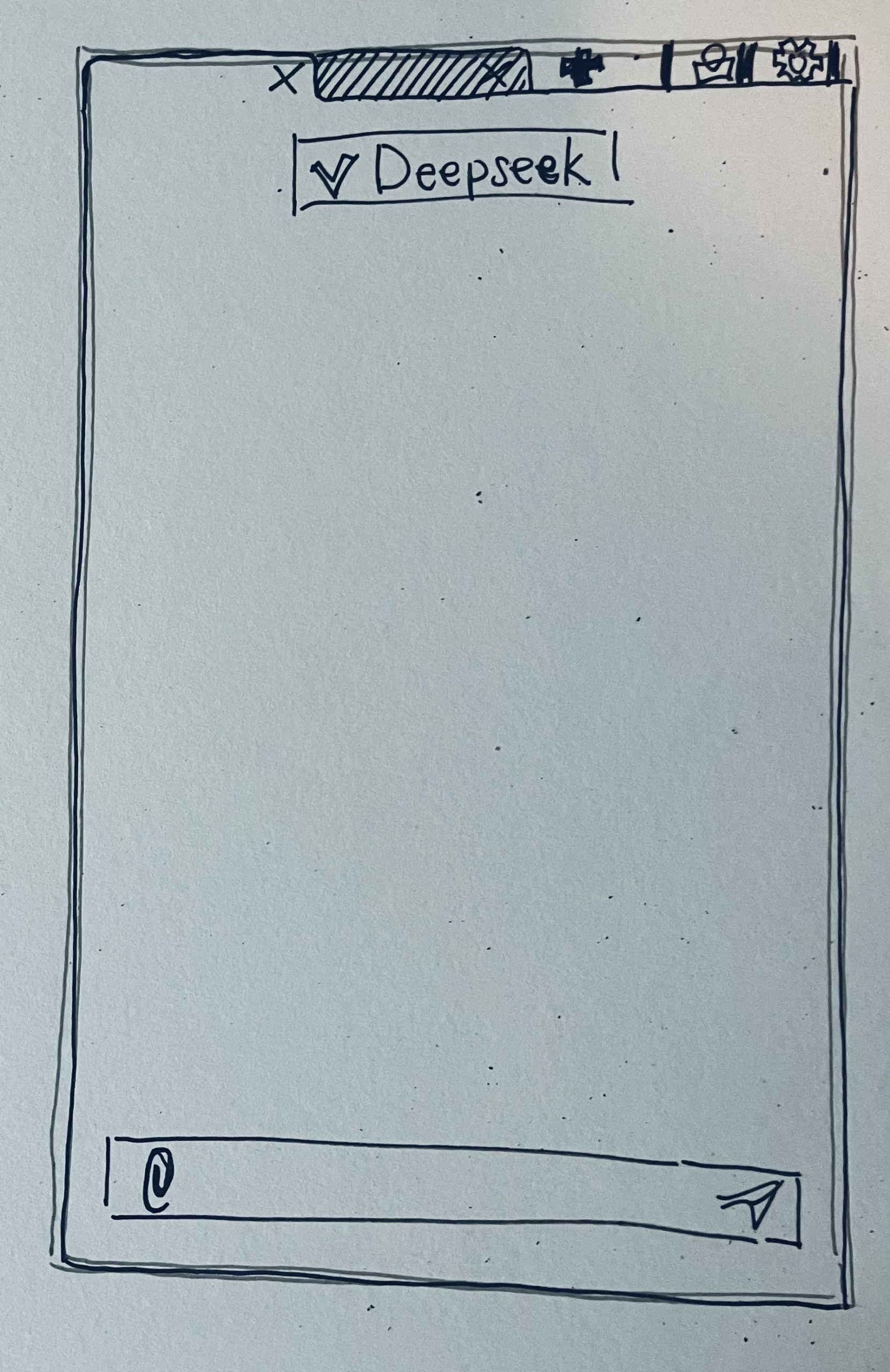
Tabs
- Each chat with an AI model is placed within a separate tab, like a browser window
- There is no way to revisit all of your files because it is assumed users will only be interested in uploading files for each chat
Considerations
- The tabs offer an advantage to the sidebar concept, where there's even a potential to mark specific chats with a color or emoji
- Icons on the top right corner may be more noticeable to users
10
Prototype & Research Plan
The next step of this project is to rapidly prototype the onboarding experience, based on Option 1, using Claude Code with grayscale elements to keep it grounded in the concept itself, rather than the UI design. As part of this testing, feedback will focus on whether users understand what local AI is, how they feel about having a default AI model downloaded, and can finish setup without confusion. The biggest constraint to this will be to make these tests not time consuming for the 5 professionals from select regulated industries I plan to share the link with, as I do not have the resources to conduct formal user testing sessions.
The results from feedback will be used to modify design choices before creating hi-fi mockups.
Selected Works




Copyright © Nathan Nasby